Home › Speed & SEO › Technical SEO for Web Designers: The Impact of Design Deci
Technical SEO for Web Designers: The Impact of Design Decisions on Search Rankings
Polished visual design can blind a development team to gaps in a page's discoverability. When a page looks complete to a visitor but reveals missing or unlinked content to search, all the visual polish in the world can't restore those rankings.
In this article
- When the page looks complete but search sees gaps
- Titles, headings, anchor text: the metadata designers actually touch
- One subject, one URL, one crawlable page
- Infinite scroll, pagination, and the cost of hiding content behind interaction
- Performance as a design constraint
- The practical design tradeoff
- Conclusion
When the page looks complete but search sees gaps
The simplest text example is when the user arrives and sees the page's full content. Googlebot does not work this way - it needs to see links to the page from other discoverable pages, and it needs to see content in text form, not just images and JavaScript.
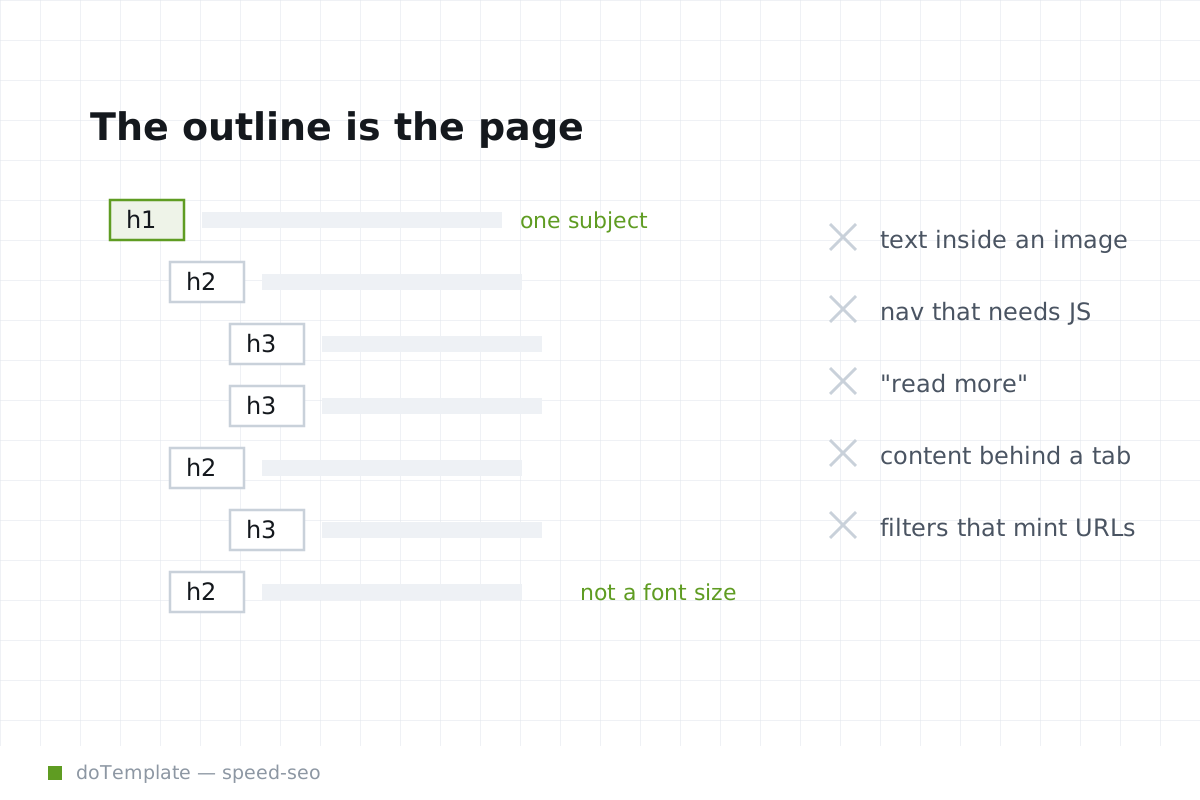
Google Search Central says all pages on a site should be reachable from another findable page, and for JavaScript apps with one HTML page, each screen or piece of individual content should have a URL. If the navigation or a page is only accessible via JavaScript, Googlebot may not see it. Google Search Central says content added via the CSS content property is not part of the DOM and Google Search ignores it at the moment.
Visual content emphatically needs a textual equivalent. If a product category page only shows images of shirts with no textual context, Google cannot understand the page's usefulness or authority.
From Google's perspective, each piece of content, each screen, is a new URL with a link leading to it. If you assemble your whole page like this without revealing the pieces to Google, it's like disabling gap lighting on a product on display - for viewers to see the whole thing is keyed to good lighting. Home clicks don't qualify as "discoverable", like they should. Beyond necessary whitespace, unnecessary visual content present alone at the expense of absent text means the equivalent of covering a room with images, but failing to show visitors how to navigate.
This is not a design problem, it is a problem of designing for search engines. You designed for people but created content that's invisible to search.
Titles, headings, anchor text: the metadata designers actually touch
A striking visual experience cannot replace textual metadata. Google Search Essentials says words people would use to look for content should appear in prominent locations such as the title, main heading, alt text, and link text. But most design teams treat the page title and meta description as a branding chance, not a crawling chance.
There are visual best practices that involve keeping text to a minimum, such as putting labels for buttons, icons, or other UI elements into the CSS. But what looks best for loading or interaction is not always the same as what works best for discoverability. Filling every page with heading tags is not recommended, but Google Search Central says every page should have a descriptive title and meta description, and that unique titles and meta descriptions help Google show relevance and can increase search traffic. So there is a visual balance to strike to optimize the space.
Effective linking is another design factor designers should touch. Google Search Central says the referring link should include either text or, for images, an alt attribute, and that the text should be relevant to the target page. In general, the link text in a link should be relevant to the target page, meaning the word or phrase in the link should match the words on the target page.
Google's advice aligns with the principle of designing for someone else — browse to this link. You would not design the page to go to something else — just casually linked to something irrelevant, including whole phrases not related or barely relevant to the link. Every leader misses when they rely on visual content or icons as links, not descriptive link text.
One subject, one URL, one crawlable page
There are common ways a design can create more content than is discoverable. If you create a page or pages only available when JavaScript is enabled, Googlebot cannot see them, especially if they are only links in JavaScript.
If you create content in response to a page action and it's not crawlable, you can also decrease discoverability. For example, clicking a link affects the page but reveals a new URL that is not crawlable. Things like accordion elements and tabs that hide content are a problem. When search engines don't crawl them or see them, sudden content is like a product sample that only the salesperson can show. It takes a click to see, and visitors will waste time moving around because they see nothing directly. Google can't index what visitors do.
For paginated content, follow Google's pagination advice: each page in a paginated sequence should have a unique URL, and it should not be the canonical page as the whole sequence.
If your pagination is dictated by a visual design, the result can be content that exists but is inaccessible. Consider component pages so that each piece is accessible when JavaScript is off.
Infinite scroll, pagination, and the cost of hiding content behind interaction
Compared with infinite scroll, component pages and paginated pages are more discoverable. Google recommends breaking infinite-scroll content into pages with URLs of their own, so that each chunk of content can be indexed separately. A page with click to expand interactions can look empty to a search engine if you bury all the content.
Navigation is one classic aspect that can hurt discoverability. A single-page JavaScript application might look polished, but it could collapse the navigation into a button instead of crawlable links to each navigation section. Using Click to expand text buttons instead of simple links aimed at each subject can also hurt discoverability. They look acceptable, but circulate crawlability around clicks — a tactic against crawling and indexing HTML URL-based navigation. Links that are part of a JavaScript application may not be crawled, but they should be crawlable so they get indexed, even if you take extra design steps to get there.
Performance as a design constraint
Google Search Central says words people would use to look for content should appear in prominent places. But from a user's perspective, relevant words that are good for search visibility might get in the way of a certain visual polish — for people who surf the page, they prefer simplicity.
Prepare a simple-to-read page without needing to go in detail — it looks more straight more aesthetic and less noise-filled. The aim is to design a page that looks clean, without all the detail — and will please users, so emphasizing keywords in a page, especially smaller a page, can negatively affect the user's perception. It looks less neat and has less distinction.
Web.dev defines a layout shift as any time a visible element changes position from one rendered frame to the next. Google Search Central says visual content added by the CSS content property is ignored. These facts together mean any auto-raised tooltips, slide-ins, or other dynamic content inserted by a script can both surprise the user and provide no discoverability benefit to a search engine, only hinder it.
Web.dev says Core Web Vitals include Largest Contentful Paint, Interaction to Next Paint, and Cumulative Layout Shift, and that they measure loading, responsiveness, and visual stability. According to Google, they measure loading, responsiveness, and visual stability. Between them, there is a tradeoff here for page designers: slow loading speeds can frustrate visitors, but hiding content behind loading can make a page seem empty.
A layout shift has no discoverability value whatsoever. This means you cannot hide a chunk of content behind a modal, or behind a change of DOM attributes, and expect that content to have any discoverability value.
Simply put, the CSS and JavaScript you use to design a page might be brilliant to the human eye — but if the right parts are hidden or generated by a script that is not fully crawlable, it won't be indexed and ranked.
The practical design tradeoff
A designer is designing for SEO without much knowledge of SEO. It's difficult to crawl the discoverability concerns for separate groups and combine them under one SEO umbrella. A person searching doesn't know all the design tools or coding script corrections they need to focus on, or they have a blind spot.
Implement, implement, implement, and to those tips of implementation — what happens to the PDF format and print view? Scrolls can become functional issues. Google says words people use to look for content on Google should appear in the text of the page, prominently displayed like in the title, main heading, and alt text. In the print view, those words are often gone, leading to different title text in the HTML for those pages, different content, less discoverability — even though the PDF might be accessible, print views usually detract from a page's crawlability. It’s a similar problem with AJAX. When search engines have trouble knowing what’s happening, they devalue information they can't fully check.
There are so many visual design choices that are actually directly related to discoverability, yet most designers don’t know — and simply put, the usability benefits of those fixes are undeniable. For example, designers should make title and meta descriptions user-friendly without full content disclosure, but full content disclosure is helpful for discoverability. So there are palatable benefits to designing these areas clearly. If page titles, meta descriptions, URLs, and other metadata aimed to attract clicks end up including unneeded symbols or text, that might hurt post-click behavior. The metadata should describe what visitors will find if they land on the page -- clearly, accurately, and completely.
From Google's perspective, every chunk of content needs its own URL, so you should not rely on JavaScript or CSS content to hide or control that discoverability. Each page, each component that contains relevant words or links, should be accessible without scripts or plug-ins. Ideally, when you design, your design doesn't hurt that rule because it’s wrong — the same way that typing on a keyboard can hurt your hand — there are ways and ways to design and you have to avoid the ways that unnecessarily hurt.
Conclusion
When you submit a page of highly polished visual design, Google Search Central and other sources do not immediately value the polish. There is a hidden courtroom comparison going on — similar arguments, similar standards of proof. Instead, it is the page's discoverability value compared to the page's discoverability potential -- Google is not looking for a perfect score, just rationality.
Whether page titles, meta, descriptions, URLs, image filenames, or content, visual content cannot replace discoverability. You should not hide text in the visual design of a page, either, or rely on JavaScript to handle navigation or large chunks of content. Consider good discoverability your baseline, then design the visuals on top of that.