Home › CSS & Code › Modern CSS in 2026: The Features You Can Finally Use Every
Modern CSS in 2026: The Features You Can Finally Use Everywhere
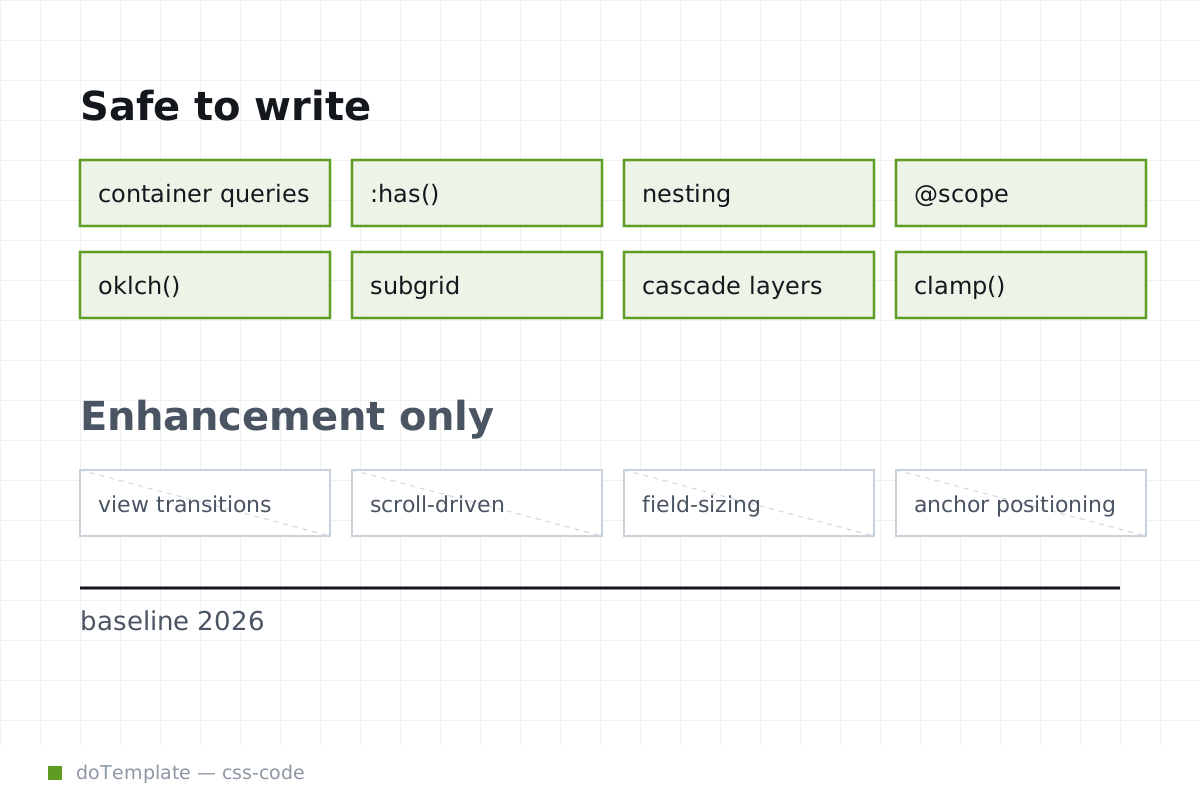
By 2026, the stack of new CSS features that can be confidently relied on with progressive enhancement has grown rapidly, with container queries, :has(), native nesting, and more reaching widespread support in modern browsers. However, it’s important to differentiate the features that are safe to write upfront from those that are still only enhancement-only.
In this article
Layout and Component Responsiveness
CSS container queries are now a core feature, allowing component styles to respond directly to the size of a container, rather than the viewport. You can alter the look of components as they are sized within layouts, from nested layouts pressing the limits of a sidebar, to deeply customizing grid cells in a dashboard. Beyond that, container queries can be nested, with styles applying only when all conditions in the chain are met. Thus, the scope for control within a layout is greater and more direct than ever before.
Container queries are not the only part of current CSS to build on media queries. You can also nest a combination of media, container, and prefers- queries to create extremely refined queries, and escape the restraints of just deciding conditions for viewport audience.
Selectors and Cascade Control
To build on layouts, styles, and animations, CSS now features an enhanced set of building blocks for rulesets: once-problematic CSS selectors, at-rules, and ways to control the cascade.
.someContainer:has(>.someChild): Sunday morning, you commit your latest feature changes. Suddenly, real-time checking starts screaming about a selector parser error. You frantically remember that selectors like this can still fall into the trap of breaking in CSS.
And yet, :has() is now universally supported, though it’s not without caveats—it can still introduce subtle complexities if you’re not careful about limiting its impact. If you’re building a layout and you have its container in the global context, you can use it as a less-flexible select to control styles without needing to build more complex DOM nesting or adding unnecessary classes. But it is more important than ever before to be cautious. A good practice now is to lace these rulesets with comments everywhere explaining what they’re doing to ensure your future-me (and possibly other engineers!) can debug CSS in the layout without needing to refactor stale and overly-generic rules.
The same is true of @scope and native nesting. Both of these make CSS more powerful and expressive, providing ways of restricting ruleset scopes and visually making nested relationships more understandable. But CSS can become more complex as you use these tools, and you’ll need to commit to using them across your codebase to avoid ending up with duplicated logic along with nested and broad selectors.
Color and Typography
Color is more powerful, too. The color-mix() function allows you to blend colors, blurring the boundaries between color naming and operations. But there are limitations; since matching color names and color operations works differently in each color space, the result you get depends on where you mix. Mixing in sRGB will be attenuated, while the result in a perceptually uniform space like OKLAB will be closer to what you might be used to if you're coming from a tool like Photoshop.
Spacing, Sizing, and Grid Syncing
Finally, CSS grids are more powerful than ever. You can use subgrid to nest grids within other grids for seamless, interconnected alignment.
However, not all of these are fully baked just yet; you’ll still need. And you’ll need to be aware of what each offers, as one could be the right fit for performance-driven components, and another for layouts where responsiveness is critical. If nothing meets your needs, you may still need to mix a heavy dose of HTML, browser APIs, and JavaScript to achieve smooth performance, even in 2026.
But what should still flag a red alert?
Components That Not Yet Baseline
In 2026, CSS is more powerful, expressive, and poetic than ever. Browser support for many features is improving, and the tools available are both functional and capable of achieving the designs we demand. Whether you’re an interface-focused product designer, a holistic front-end engineer, or leading your organization’s design systems, CSS can do more and offer more contextual help than ever before.
Anchor positioning is the leading card to flag, even in 2026. While supported, its implementation and commonality vary from browser to browser, and it’s still not stable enough to treat as a baseline replacement for alternatives.
If you're careful, CSS enable you to make exquisite and soulful layouts without needing the advent of new renderable JavaScript for HTML, enhanced accessibility APIs for content, or new layout engines for UX. Powerful, subtle, expressive, direct, and enabling—CSS is the companion of the intentional product designer.