Home › WordPress › Block Theme vs Classic Theme WordPress: Which Server Archi
Block Theme vs Classic Theme WordPress: Which Server Architecture You Want
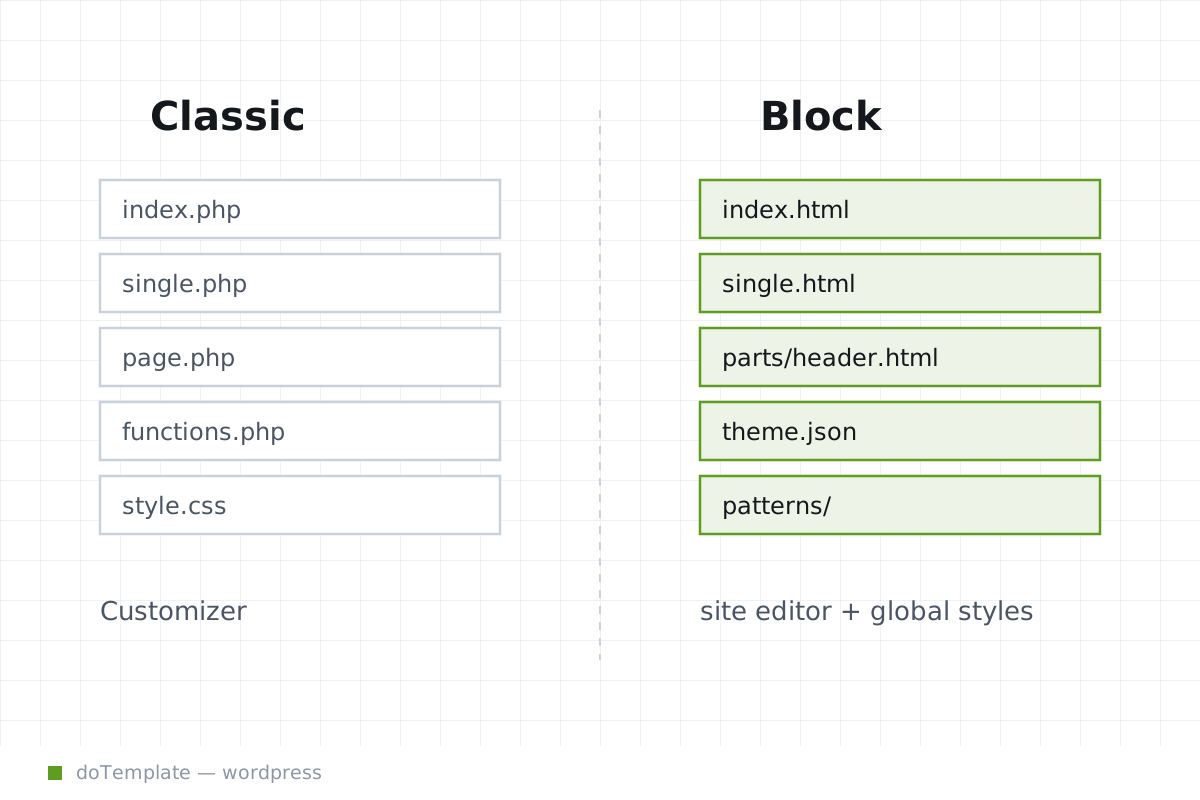
When starting a new WordPress site, the choice between a block theme and a classic theme is more than a question of aesthetics – it is an operational decision that affects how the site will be edited and styled over its lifetime. A block theme, defined at its core by HTML templates and block content markup in a block-templates or templates directory, allows site builders to edit their entire site using the Gutenberg block editor, including headers, footers, and sidebars. In contrast, a classic theme relies on older structures such as PHP templates, the Customizer, and widget areas to manage the site layout that cannot be touched in the block editor. This choice has real consequences for the coming months of maintenance and revisions.
In this article
- An Anatomy Lesson: What Classic and Block Themes Are Made of
- Decision Time: Who Will Edit the Site on a Day-to-Day Basis
- The Site Editor's theme.json: Wordpress's New Unit of Style Code
- Side Effects: What Breaks or Changes When You Choose Blocks
- Situational Fit: When Each Makes Sense
- Block Theme vs Classic Theme WordPress: The Editor's Choice
An Anatomy Lesson: What Classic and Block Themes Are Made of
A block theme's defining feature is its structure of HTML template files and the block editor-friendly templates. At minimum, a block theme must include an index.html file in a block-templates or templates subdirectory, where the theme's templates are marked up as block content, according to the WordPress Block Editor Handbook from August 24, 2026. A canonical way to define block behavior across a site is to use a theme.json file in the root theme directory. This file governs the site's default styles and editor settings, allowing designers to centrally set colors, typography, spacing, and other design choices.
Classic themes, in contrast, rely on a structure of PHP template files that realize the site structure when presented to the browser. Classic themes rely on the legacy site editor to realize changes to these files and the Customizer for layout choices.
Decision Time: Who Will Edit the Site on a Day-to-Day Basis
The decision to pick a block theme or a classic one has direct consequences for who can contribute to the site's ongoing evolution. A block theme, by supporting all site changes via the Gutenberg block editor at Appearance → Editor, empowers any logged-in site editor to both make design and layout and add content on a broad level. This includes inserting and restyling content, adding or rearranging site elements, and adjusting colors and layouts using the Block Styles UI.
Classic themes push most site layout and design changes outside core Gutenberg experiences. The Gutenberg block editor still features prominently for post and page content, but the Customizer and widget areas govern other layout changes, primary navigation, and sitewide branding. Theme developers, familiar with PHP, CSS, and Classic Widgets, will remain essential.
The Site Editor's theme.json: Wordpress's New Unit of Style Code
Both theme architectures support centralized styles, but block themes' approach is deeper integrated thanks to the theme.json. This file as defined by WordPress documentation from mid-August lets a theme developer set sitewide defaults for colors, typography, spacing and layout, and define which blocks can appear in the editor. Add users' WordPress Global Styles settings to this foundation, and a WordPress site becomes a combination of customizable styles and default settings.
Side Effects: What Breaks or Changes When You Choose Blocks
Making the shift to blocks has direct consequences for plugins that create blocks, and for page builders.
Situational Fit: When Each Makes Sense
There's an objective basis for a careful site editor to choose one theme type over another on purpose: operational factors, not visual ones.
Block Theme vs Classic Theme WordPress: The Editor's Choice
WordPress.org selects theme architecture according to editorial strategy, not just visual preference. Block themes suit editors looking to minimize dependencies on custom code, offload daily design iterations to theme.json, expand content creation beyond the blog, and limit their workflows to Gutenberg experiences only. Classic themes suit sites that depend on design decisions managed outside the block editor script.
To sum it up, the block or classic theme choice is more than just a design decision - the impact will be felt in the day-to-day editing, the sites' ability to update and scale, and the users' ability to adopt.